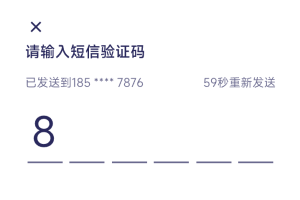
最近移动端项目需要改版,以前用的UI库不符合现在的设计图,改着太费劲想了想还是自己封装快一些,下面只针对输入框实现进行代码说明其他样式省略
实现思路
方式一:多个input框,每个输入框限制输入数字和最大长度1,输入完一个自动让下一个输入框自动获取光标进行输入,直到最后一个输入完成,自动调用接口,删除时则相反
方式二:一个input框,设置透明,覆盖在最上层输入时获取值进行切割,然后显示在对应位置
方式一
html
<div class="msgbox" >
   <input
     type="number"
     v-for="(item, index) in code"
     ref="attr"
     :key="index"
     :maxlength="1"
     v-model="item.num"
     @input="(e)=>{handleInput(e,index)}"
     @keydown.delete="(e)=>{handleDelete(e, index)} "
     :readonly="item.isRead"  />
</div>
js
<script>
export default {
  name: "msgcode",
  props:{
    codeLength:{default:6},
  },
  data(){
    return{
      code: [], // 多输入框的方式
    }
  },
  created(){
    this.instor();
  },
  methods:{
    instor(){
       this.code = [];
       for(let i=0 ;i<this.codeLength;i++){
         if(i==0){
           this.code.push({  num:'', isRead:false})
         }else{
           this.code.push({ num:'', isRead:true })
         }
       }
    },
    // 输入
    async handleInput(e,index) {
      let num = this.code[index].num
      if(num.length>1){
        this.copyNum(num);
      }else{
        if(!Number(num)){ //如果不是数字
          this.code[index].num = '';
          return;
        }
        for(let i = 0;i<this.codeLength;i++){
          this.code[i].isRead = true;
        }
        if(index >= (this.codeLength-1)){ //输入到最后一个
          this.confirm();
        }else{
          this.code[index+1].isRead = false;
          this.$nextTick(()=>{
            this.$refs.attr[index+1].focus()
          })
        }
      }
    },
    // 删除
    handleDelete(e,index) {
      if(index==0)  return;
      let ii = index;
      for(let i=0;i<this.code.length;i++){
        if(this.code[i].num!=''){
          ii = i
        }else{
          this.code[i].isRead = true;
        }
      }
      if(ii!=index){
        this.code[ii].num = '';
        this.code[ii].isRead = false;
        this.$nextTick(()=>{
          this.$refs.attr[ii].focus()
        })
      }else{
        this.code[index].num = '';
        this.code[index].isRead = false;
        this.$nextTick(()=>{
          this.$refs.attr[index].focus()
        })
      }
    },
    // 复制来的验证码
    copyNum(num){
      for(let i = 0;i<num.length; i++){
        if(!Number(num[i])){
          this.code[i].num = '';
          break
        };
        if(i>(this.codeLength-1)) break;
        this.code[i].num = num[i];
        if(i<(this.codeLength-1)){
          this.code[i].isRead = true;
          this.code[i+1].isRead = false;
          this.$nextTick(()=>{
            this.$refs.attr[i+1].focus()
          })
        }else{
          this.code[i].isRead = true;
          this.confirm()
        }
      }
    },
    confirm(){
      let codetext = ''
      this.code.forEach(item => {
        codetext+=item.num
      });
      console.log(codetext)
    },
  }
};
</script>
css
.msgbox{
    display: flex
    justify-content: space-between
    color #2A295D
    padding: 5px 16px 25px
    position: relative
    input{
      font-size 48px
      width: 42px
      text-align: center
      height: 70px
      border-bottom 2px solid #6A698E
    }
  }
方式二
html
<div class="msgbox">
   <div class="msgbox-item" v-for="(item,index) in codeList">
      <div v-if="code.length>index" :key="index">{{code[index] ||''}}</div>
      <div class="line" v-if="code.length == index&&focus">|</div>
   </div>
   <input class="code-input-input" ref="inputdom" @blur="focus=false" @focus="focus=true"
   v-model="code" :maxlength="codeLength" type="number" pattern="[0-9]*"/>
</div>
js
<script>
export default {
  name: "msgcode",
  props:{
    codeLength:{default:6},
  },
  data(){
    return{
      codeList: [],
      code: "",
      focus:true
    }
  },
  created(){
    this.instor();
  },
  watch: {
    // 截取字符长度
    code() {
      if (this.code.length > this.codeLength) {
        this.code = this.code.substring(0, this.codeLength);
      }
      if(this.code.length == this.codeLength){
        this.confirm();
      }
    }
  },
  methods:{
    instor(){
      this.codeList = new Array(this.codeLength).fill("");
      this.code= "";
      this.$nextTick(()=>{
        this.$refs.inputdom.focus();
      })
    },
    confirm(){
      console.log(this.code)
    },
  }
};
</script>
css
<style scoped lang="stylus">
.msgbox{
  display: flex
  justify-content: space-between
  color #2A295D
  padding: 5px 16px 25px
  position: relative
  .msgbox-item{
    text-align: center
    font-size 48px
    margin-right: 12px
    width: 41px
    height: 65px
    border-bottom 2px solid #6A698E
    &:last-child{
      margin-right: 0
    }
    .line{
      font-size 46px
      opacity 0;
      animation: cursorAnimation .5s infinite alternate;
    }
    @keyframes cursorAnimation {
      0% { opacity: 1; } /* 初始状态 */
      100% { opacity: 0; } /* 结束状态 */
    }
  }
  .code-input-input {
    position: absolute;
    border: none;
    outline: none;
    width: 200%
    height: 65px
    left: -100%
    opacity 0
    color: transparent;
    background-color: transparent;
    text-shadow: 0 0 0 transparent;
  }
}
input::-webkit-outer-spin-button,
input::-webkit-inner-spin-button {
    -webkit-appearance: none !important;
    margin: 0;
}
</style>
以上是本人总结的两种实现方式,如果对您有帮助请帮忙点个赞,如果有问题请留言一起讨论
- THE END -

最后修改:2024年10月24日